![[Main topics]](../z_designs/navbar-2.gif)
![[Navigation]](../z_designs/navbar-x.gif)
FrameMaker plug-ins
Properties of FM plug-ins
Essential FrameMaker plug-ins
Further links
Properties of FM plug-ins
FrameMaker plug-ins speed up your work. In contrast to plug-ins in other applications, FrameMaker plug-ins need not be present at a target installation opening a FrameMaker document handled with plug-ins.
Two types of plug-ins are distinguished in the context of FrameMaker:
- Explicitly developed programs using the FM Application Programming Interface (API). These programs normally are developed in C++. The smaller number of these are free, most authors request a moderate fee. Only few are expensive, but very powerful.
- Scripts for the general-purpose plug-in FrameScript, which belongs to the first category. Scripts are text files and many of them are freely available. For FrameMaker starting with version 10 an internal script language ExtenScript allows additional functions whithout a special script interpreter.
- Since FM-10 the scripting language ExtendScript is implemented in FrameMaker. This allows to replace many of the dll- versions by scripts. This gives the advantage that new FM versions do not trigger additional work on the plug-in (recompilation etc.). ExtendScript is also implemented in other Adobe products (Photoshop, Indesign, Illustrator, ...) and hence can correspond with these applications. In some areas (e.g. location of menu items) ExtendScript does not werok correctly [2019-11-16].
When installed, plug-ins become visible as additional functions to standard menus (such as Graphics > Clear Runarounds) or they set up an new main menu (such as FrameScript).
A special kind of plug-ins react on specific events. They become active, for example, just before a file is saved or when a graphic is imported. The operation of these plug-ins may completely be hidden or become visible by a modified or new dialogue.
Essential FrameMaker plug-ins
A 'complete list of FrameMaker plug-ins' does not exist. However my favorite list is that of Leximation.
The following is my personal list of 'must have' plug-ins. For special
needs, some authors provide services to develop custom plug-ins to solve special problems in a distinct environment.
AutoText
Enhanced Tool Bars
[i]-frame
Index tools
MIF-browser
More plug-ins
AutoText
| Purpose | Allows you to define a set of text or graphic items and easily insert them into any FrameMaker document. The items may be tables and other objects. |
|---|---|
| Author | Silicon Prairie Software |
| Type | Shareware, USD 10.- |
| Platforms | SUN Solaris, Mac, Windows |
| User interface | Top menu AutoText with defined items as menu entries. Submenues may be defined. All items are defined in autotext.fm . |
| Documentation | PDF with the product. |
Enhanced Tool Bars
This is my continuation of the famous Express Customisation by Shlomo Perets
| Purpose | Tool bars for the unstructred FrameMaker interface are enhanced with many often used functions. See Enhanced Tool Bar (ETB) for FrameMaker. |
|---|---|
| Author | Klaus Daube |
| Type | Donationware |
| Platforms | Windows |
| User interface | Coloured buttons even for the gray versions of FM, new KB-shortcuts, additional table in Equation palette, more Help topics. |
| Documentation | PDF within downloaded file. |

[i]-frame
Unfortuanately these scripts are no more available - itl decided not to market them any more in 2020 when maintenence cost outweighted the renvenue significantly.
| Purpose | Sets of FrameScript tools divided into 4 levels. The list of tools given here is only an excerpt. There are many more in each level: Among these there are free scripts. See |
|---|---|
| Author | itl, Germany |
| Type | Commercial, 445 EUR (1 licence for 1 module) to 885 EUR (1 license for all modules) |
| Platforms | Windows. Requires the installation of the FrameScript. |
| User interface | Top menu [i]-frame with various submenues. User dialogues and FM definition documents. |
| Documentation | Help in submenu, the website with all descriptions. |
Index tools
| Purpose | Provide in-text entry of index information and switch to standard FM index markers. This makes index maintenance (find, replace etc.) very easy. |
|---|---|
| Author | Silicon Prairie Software |
| Type | $10 for a single-user license, $100 for a site license |
| Platforms | Windows |
| User interface | Main menu Index Tools with few entries |
| Documentation |
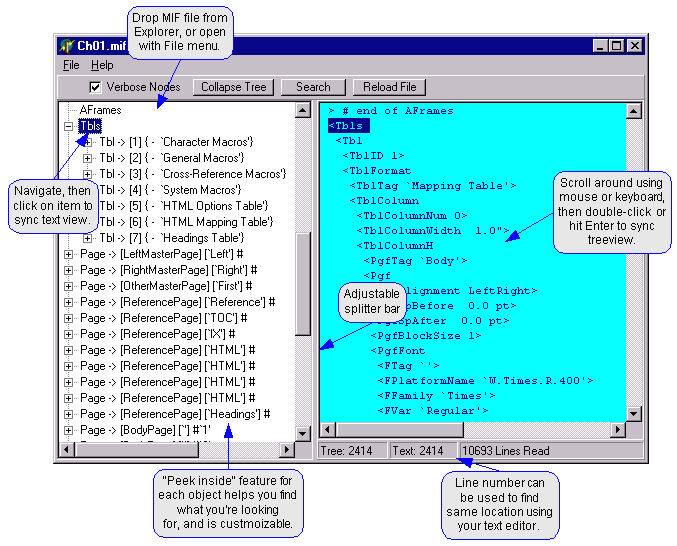
MIF-Browser
| Purpose | Display the structure of a MIF file similar to a directory structure. Display the contents of the structural elements. |
|---|---|
| Author | Graham Wideman |
| Type | Freeware |
| Platforms | Windows |
| User interface | Program dialogue with two panes for structural view and contents view |
| Documentation | HTML within downloaded file or on site. |
More plug-ins
Check out the following links - or consult the Tool Search of Leximation. This database contains not only tools for FrameMaker, but also general utilities for Windows or Mac.
Another great list from Lim Sims (last update 2012) is available from Microtype.
Carmen Publishing: Rick Quatro developed a number of FrameScripts and ExtendScripts, such as TableCleaner, ImportSpecial, FindChangeFormatsBatch, PathChanger etc.
Cudspan: TemplateMapper is a tool that converts your legacy documents to match the formatting in new templates, Other plug-ins are not available for all FM-versions.
DITA-FMx is a set of plugins and structure applications that provide enhanced authoring and publishing of DITA XML files in FrameMaker.
Finalyser is the successor of the SQIDDS toolbox for FM≤8. It is an integrated collection of scripts and plugins to support the workflow of technical communication. There is for example a script to create thumbnail images with PhotoShop. The package TermCheck allows to check terminology against a UniTerm Light data base.
FrameScript is a high level, user-oriented, scripting (or macro) language designed to work with Adobe FrameMaker on Windows. It is the base for many tools and "tool boxes".
[i]-frame from itl is a comprehensive FrameScript collection that makes working in FrameMaker easier and offers complete support to the FrameMaker user for the creation of documents. Both routine documentation tasks and specialized requirements in the translation business are supported. Examples include document clean-up, quality assurance using check routines, development and maintenance of templates and variables, and improved creation of foreign-language documents.
The use of FrameScripts requires the FrameMaker plugin "FrameScript".
Other large packages from itl are:
 [i]-flow – Process automation of documentation and translation processes across departments or even companies.
[i]-match – Authoring support with controlled terminology (language management system for the whole company).
Microtype: FrameMaker-to-Acrobat TimeSavers, Form Assistant etc. are the tools to create sophisticated PDF functions directly from FrameMaker source.
For FrameMaker up to version 8 Express Custimization of tool bars is avaialable.
For FM-9 to 12 menu customisations are provided.
Mif2Go: This very versatile tool was created by Jeremy H. Griffith, the founder of Omni Systems, who passed away in 2014. The tools have been made Open Source:
Mif2Go creates various output formats: HTML, DITA, OmniHelp, Word RTF. It is very flexible!
OmniHelp (OH) is a free Open Source LGPL cross-platform, cross-browser tri-pane Help viewer.
Silicon Prairie Software: Alert Tool, Auto-Text, Character Tools, Color Tools, Cross-Reference Tools, Index Tools (normal, Professional), LEP (List of Effective Pages) Tools, Master Page Tools, Outline Tools, Paragraph Tools, Readability Tools, Table Tools, Variable Tools.
West Street Cunsulting: Tools supporting structured working in FM; a comprehensive Graphics utility Pod.