![[Main topics]](../z_designs/navbar-2.gif)
![[Navigation]](../z_designs/navbar-x.gif)
Enhanced Tool Bar for FM 7.2 and FM 8
See also Deutsche version and english versions for later FM versions.
The Enhanced Tool Bar is based on the “FrameMaker Express Customization” of MircoType .
The Enhanced Tool Bar offers a modified QuickAccess Bar, an enhanced Formatting Bar, extended context menüs, many useful keyboard short cuts, and direct access to FrameMaker templates and clip art as well as online manuals and reference tables. It also offers an extended Vertical Tool Bar. Please consult this PDF, before you decide on an installation.
- Tool Bars
- Context menüs
- Documents and reference tables
- Vertical Tool Bar
- Download and installation
- Uninstallation
![[To top/bottom of page]](../z_designs/nav-dnup.gif) Tool Bars
Tool Bars
In the QuickAccess Bar (the upper one) the right part has been modified
to use only two levels for work with text/table and graphics.
The Formatting Bar (lower) has been enhanced with a drop down list for character
formats and many additional buttons. These additional functions can also
be accessed by keyboard short cuts.

Context
menus
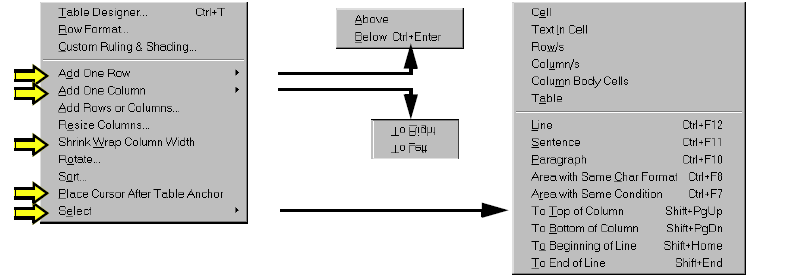
Most context menus have been extended, for example the context menu within
tables:
Documents
Access to documents and other useful information is established
with the menu Help > Enhanced Toolbar:
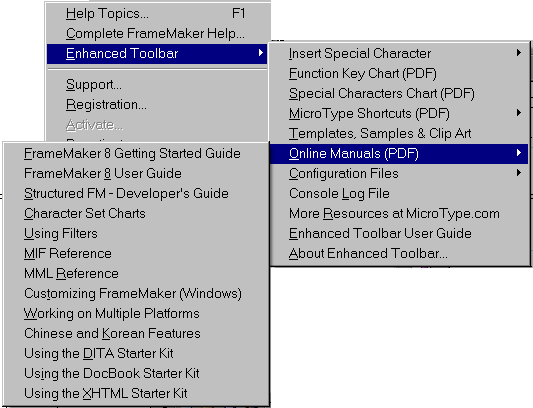
In the FM-8 version a number of documents for FM-7.x are provided, because they are still useful.
Vertical
toolbar

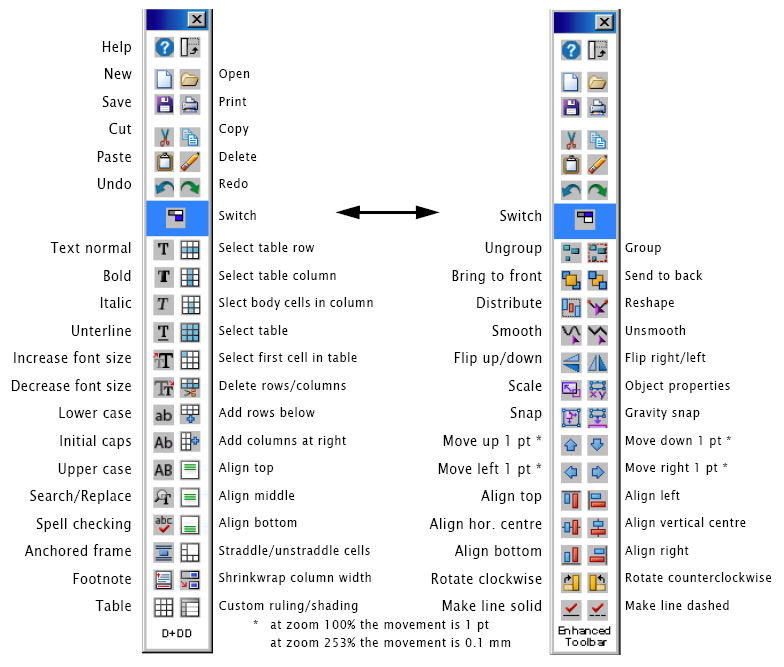
The vertical toolbar has been modified to use 2 levels only
analogous to the QuickAccess Bar.
The most left Icon of the QuickAccess bar and the top right icon on the Vertical
Tool Bar switch between the two displays.
Download and installation
The installation of the Enhanced Toolbar requires that the ToolbarPlus Express from MicroType (USD 25.-) has been purchased. This is checked during installation.
- You may wish to read the documentation (1MB) before you decide about the installation.
- Expand the downloded ZIP to any location (to be memorised). This will
only store one file
FMTBPlusExp.zip. - Close FrameMaker, if necessary.
- Download the
installationprogram:
FM version Tool bars for FM 7.2: 7.2 Date Version Installation file Changes for FM 7.2 2010-02-05 1.2 Inst-FM72-toolbars-en.zipFirst issue of installation program (same level as FM-8 v1.2) 8 Date Version Changes for FM-8 2010-02-05 1.2 Inst-FM8-toolbars-en.zipInstallation: support multiple FM-users;
Tool bars: correct handling of characters "degree" and "multiply"; vertical tool bar modified to 2 levels2010-01-27 1.1 Change installation process to protect MT's work 2009-01-10 1.0 First issue of installation program - Expand the downloaded ZIP to any location. This will only store one file
Install-FM72-toolbars-en.exe(respInstall-FM8…) - Execute this self extracting archive, which expands its files to
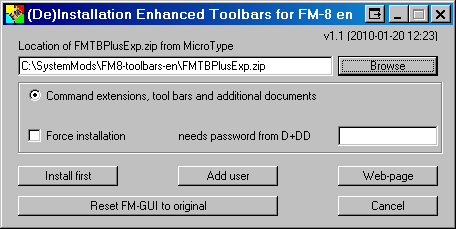
C:\SystemMods\FM72-toolbars-en\(respC:\SystemMods\FM8…) and then starts the the installation program
File structure set up in
C:\SystemMods\FM8-toolbars-en\DDD
FM-puzzle.ico
Install-FM8-etb.exe - [2019-03-07] Attention:
The Microtype Toolbar Plus Express can no more be purchased.
Hence leave the top entry field empty, check Force installation and enter quetzalcoatl as password. - Install the files with Install first. A message box indicates successfull installation (see also first note hereafter).
Notes
- Although the last step may indicate successful installation, it sometimes happens that the self extracting ZIP does not extract all files properly. In such cases just repeat the installation.
- To install the Enhanced Toolbar for another FrameMaker user on the same machine, see the documentation.
- All software from D+DD is Donationware - if you find it helpful for your work, think about supporting my work.
What is installed on your computer ?
- A shortcut
(De)Installation FM8-tool bars enis placed in the Start Menu folderAll Users\Programs. You may move the shortcut to any sub folder. - The following files are copied to the required locations:
- The customisation file and documents to
$HOME\fminit\configui - The vertical tool bar to
$HOME\fminit - The additional clip art to
$HOME\clipart
- The customisation file and documents to
%APPDATA% is the symbolic name for the User area C:\Documents
and Settings\username\Application Data.
$HOME is the installation directory of FrameMaker.
Uninstallation
If you want to get rid of the enhancement and go back to the original FM installation:
- Start the installation with the shortcut in the Start Menu and click Reset FM-GUI to original .
- All files of this installation will be removed (config files, clip art, add. documentation).
- Since this is not a Windows un-installation, you must delete the installation directory and the short cut manually to get rid of all items. On the other hand this allows to install the Enhanced Toolbar again later.