![[Main topics]](../z_designs/navbar-2.gif)
![[Navigation]](../z_designs/navbar-x.gif)
Tame the dangerous dialogue Resize Selected Columns (FM 6 and 7)
Weak German translation
Modified dialogues
Download and install modified dialogues
Note: This issue has been resolved with FrameMaker 8. FM 8 provides an adaequate dialogue.
Caveat
According to the licensing terms of Adobe, the modification of dlls may invalidate your licence.
The problem
Since FrameMaker 4 users are complaining to Frame Inc. and later to Adobe that one of the dialogues is dangerous (while others are just inelegant): the dialogue to resize columns in tables:
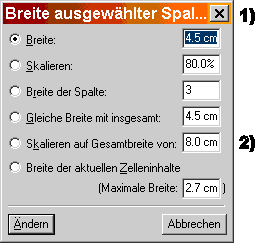 |
1) In some language versions the heading is incomplete Generally all fields displaying the current width (or widths) are too narrow. Hence you do not see the real value and your work is mislead if you just select a visible item and change it. 2) For example, here the display says 8.0 cm, but the real value in the field is 18.0 cm. Changing the 8 to a 9 in effect changes 18 to 19! You will note this only if you place the cursor in the field and move it to the left with the arrow keys. Always double click on the numeric value in the field (to select the complete value) before you enter a new value. |
![[To top/bottom of page]](../z_designs/nav-dnup.gif) Weak translations
Weak translations
The German dialogue is even worse, because the translation is not very clear:
| English | German | Proposed German |
|---|---|---|
| To Width: | Breite: | auf Breite: |
| By Scaling: | Skalieren: | Skalieren: |
| To Width of Column Number: | Breite der Spalte: | auf Breite der Spalte Nummer: |
| To equal Widths Totalling: | Gleiche Breite mit insgesamt: | auf gleiche Breite mit insgesamt: |
| By Scaling to Widths Totalling: | Skalieren auf Gesamtbreite von: | Skalieren auf Gesamtbreite von: |
| To Widths of selected Cell's Contents | Breite der aktuellen Zelleninhalte | auf Breite der aktuellen Zelleninhalte |
Modified dialogues
There are about 300 dialogues in fmdlg.dll - only this dialogue
is so badly designed...
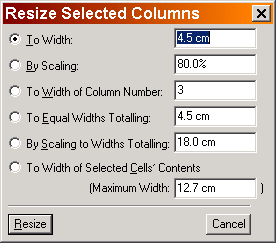
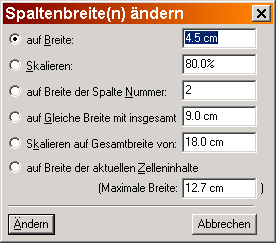
I have modified the dialogue with the localisation tool Passolo. and checked the function of both the English and the German version on W2K and NT 4 for FrameMaker 6 and FrameMaker+SGML 6 (6.0p357) and FrameMaker 7 (7.0p576).
 |
 |
Download and install the modified dialogue
Locate the resource DLL fmdlg.dll in $HOME/fminit
and check its version (right click to get the context menu for file properties).
If your values are different, be prepared to re-install the original dll!
FrameMaker may not work any more after the change.
| FrameMaker version | size of original dll | download file |
|---|---|---|
| 6 English international (6.0p357) | 389’120 bytes | fmdlg.dll.6en_mod |
| 6 German (6.0p357) | 405'504 bytes | fmdlg.dll.6de_mod |
| 7 English international (7.0p576) | 356'352 bytes | fmdlg.dll.7en_mod |
| 7 German (7.0p576) | 372'736 bytes | fmdlg.dll.7de_mod |
| 7.1 English international (7.1p116) | 356'352 bytes | fmdlg.dll.71en_mod |
The file fmdlg.dll.71en_mod not only fixes the Column Resize
dialogue, but many more. See dialogue modifications
for more details.
Follow this procedure to install the modified dll:
- Close FrameMaker, if necessary.
- In
$HOME/fminitrenamefmdlg.dlltofmdlg.dll.ori(for original) - do not delete the file! - Copy the downloaded
fmdlg.dll.xxx_modto$HOME/fminitand rename it tofmdlg.dll. - Start FrameMaker and check the modified dialogue.
- If FrameMaker gets any problem, resort to the original DLL.
- Keep in mind that a FrameMaker update will install an Adobe original module and you may have the same old dialogue.
- Keep a record of changes to FrameMaker, for example, in a file
!_modifications.txtin the$HOMEdirectory
(for exmple, D+DD keeps a record of all sw-installations and changes inD:\System_ddd\Documentation\applications.fm).