![[Main topics]](../z_designs/navbar-2.gif)
![[Navigation]](../z_designs/navbar-x.gif)
Modified dialogues for FrameMaker 7
More than 40 dialogues have been adapted and are depicted in this documentation.
For
UI modification for FrameMaker 8 see here.
Why modify the dialogues of FrameMaker?
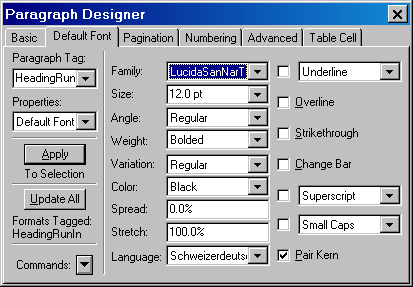
Sample dialogue
Download and install the UI modification
Indication of modified dll
Caveat
According to the licensing terms of Adobe, the modification of dlls may invalidate your licence.
![[To top/bottom of page]](../z_designs/nav-dnup.gif) Why modify the dialogues of FrameMaker ?
Why modify the dialogues of FrameMaker ?
The most annoying dialogue which I fixed 2002 was the Table Column Resize dialogue.
Only "recently" added dialogues (such as the book management) in FrameMaker benefit from larger displays. Most dialogues provide very limited input fields for names of character styles, paragraph styles end the like. The small fields may be sufficient for english names, but not for german or french useful names. Many attempts were made in the past to convince Adobe about this requirement, but to no effect so far.
Since the Windows 95 times resources (icons, pictures, text, dialogues) are
kept separate from the programming code. This not only gives room for easier
translation but also for other modifications of the dialogues without touching
the executable code. All relevant dialogues in FrameMaker are located in the
module fmdlg.dll. Messages are located in fmres.dll.
Of course, a modified dialogue resource does not become resizeable if this
feature is not handled by the program code.
The most annoying dialogue which I fixed 2002 was the Table Column Resize dialogue. Other people, in particular Stefan Gentz from tracom.de have modified many dialogues for the German version of FrameMaker. Stefan's work gave me the hints what to do for my own requirements:
- Leave out the drop down lists which is redundant to the selection tabs in document numbering, paragraph designer and table designer. This drop down list is a residuum from the Unix interface.
- Provide more room for lengthy names of fonts, styles, table names, colours, cross references etc.
- Extend other small fields.
- I have not modified the dialogues concerning the structued interface, only those of the unstructured interface. Hence no long element names etc. are supported by this modification.
Sample dialogue
| Standard dialogue | Modified dialogue | |
|---|---|---|
 |
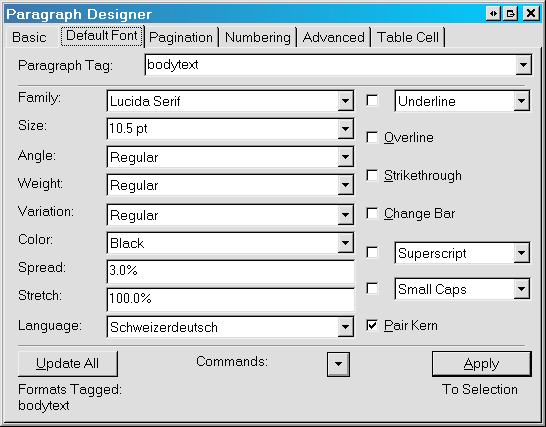 |
Modifications done in this dialogue (an on most other modified dialogues):
- Redundant drop down list removed
- Space for long style names
- Space for long font names
- All buttons at the bottom
- Some of the entry fileds and drop down lists may seem to be too wide for their purpose, but I like it neat and aligned.
Download and install the UI modification
Locate the resource DLL fmdlg.dll in $HOME/fminit
and check its version (right click to get the context menu for file properties).
If your values are different, be prepared to re-install the original dll!
FrameMaker may not work any more after the change.
Attention: If the browser starts to display the binary file, stop transmission and use the context menu item "Save Target as ...".
original |
|||
|---|---|---|---|
| FrameMaker version | dll version | dll size | modified file |
| 7.1 English international (7.1p116) | 1.0.0.1 | 356'352 bytes | fmdlg.dll.71en_mod |
7.2 English international (7.2b128, b144 and p158) 2007-05-11: dialogues for markers and user variables now have more room, some other minor changes to the 2005-10 version. |
1.1.0.1 | 356'352 bytes | fmdlg.dll.72en_mod |
Note: All software from D+DD is Donationware - if you find it helpful for your work, think about supporting also my work.
Note: Although the original dlls version 7.1 and 7.2 are of same size, they are slightly different: a new palette for the undo history was introduced in version 7.2.
Follow this procedure to install the modified dll:
- Close FrameMaker, if necessary.
- In
$HOME/fminitrenamefmdlg.dlltofmdlg.dll.ori(for original) - do not delete this file! - Copy the downloaded
fmdlg.dll.xxx_modto$HOME/fminitand rename it tofmdlg.dll - Start FrameMaker and check the modified dialogues.
- If FrameMaker gets any problem, resort to the original DLL.
- Keep in mind that a FrameMaker update will install an Adobe original module and you may have the same old dialogues.
- Keep a record of changes to FrameMaker, for example, in a file
!_modifications.txtin the$HOMEdirectory
(for example, D+DD keeps a record of all sw-installations and changes inD:\System_ddd\Documentation\applications.fm).
Indication of using the modified dll
The modified fmdlg.dll contains the following text in the Help
> About panel:


