![[Main topics]](../z_designs/navbar-3.gif)
![[Navigation]](../z_designs/navbar-x.gif)
Windows experiences and tips
Whoever works with any flavour of Windows encounters a number of problems and an even greater number of annoyances. The user interface is not consistent at all, a lot of stuff is missing, system documentation does not exist etc. She or he also develops preferences for tools and utilities. I have now used Windows 3.x, 95, NT 4, W2K, W7 and finally W10. Most of the experience I have collected in a local help database on my system, but some tips may be of broader interest.
For documentation tools D+DD uses, see section documentation.
General

Windows 95 … 10
![[To top/bottom of page]](../z_designs/nav-dnup.gif) Valuable sources of information
Valuable sources of information
In the good old days of main frames there were system programmers, now zillions of so called Personal Computer users do the same thing over and over: hunt problems, fix bugs, download updates, install new hardware (because programmer's discipline is a foreign word to MS) etc.
Windows users spend at least 20% of their time with dragon fights. This is our money directly going into the pocket of BG. Fortunately some generous peers provide information for free:
- Fortunately the information provided in the web has evolved since last century and you will find andwers to your problems. For example, if you enter a complete error message in apostrophesinto a search field you may get a very specific answer.
- There are forums for nearly all avaiilable software, even share ware authors mainain forums. Please refreain from stating "it does not work" - this is useless information for anybody trying to help you!
- The ultimate data driven antivirus comparison: Using independent antivirus lab test results and website review scores, we charted and compared top AV tools based on multiple points, including overall protection, system performance, false positives, price, and more.
- If you maintain a log of errors you encountered and solved this may be a valuable source for recurring errors. I have set up an AHK script which is invoked at the start of Windows and another which is invoked on demand. this one closes the Windows session. It can also be used to just log a message. An excerpt of my log looks like this:
Mon 2022-03-28 09:50:12 Starting 1404 OS: 21H1 Build: 10.0.19043.1586 Mon 2022-03-28 09:51:21 Logging 125 unwanted files, folders, shortcuts deleted Mon 2022-03-28 09:53:37 App failed ; Tablet: single touch creates double click; Reboot Mon 2022-03-28 09:55:08 Starting 1405 OS: 21H1 Build: 10.0.19043.1586 Mon 2022-03-28 18:47:29 ; ; Force hibernate Mon 2022-03-28 18:47:36 ; ; Suspend 4 Mon 2022-03-28 19:33:12 ; ; Resume 7 Mon 2022-03-28 19:33:12 ; ; Resume 18 Mon 2022-03-28 20:03:54 Ordinary Close ; ; Shut down - I also maintain a small data base for application specific information and management of my own projects. This is done with AZZ Card File.
Squeeze out what's in already
Did you know, that Windows 95 and its successors (at least until Win7) are not that bad at all?
- Keyboard shortcuts can speed up your work or help you with a dead mouse
- Move the coursor carefully with mouse keys
- Number files with File Explorer:
- Select the files to rename,
- Right-click the first, choose Rename and type the name, for example Vacation2003.jpg.
- Files will be named Vacation2003(1).jpg, Vacation2003(2).jpg and so on. - Start File Explorer with parameters to get a specific view
Enhance File Explorer
- Copy PostScript file directly to PostScript printer (add a command to the Send To selection).
- Highlight important text files
- Indicate open folders
- Enhance the Send To command to get file information to the clipboard. Be aware that not all PowerToys work in newer Windows versions. This is a real releaf if you have multiple projects. Rather than dig down in every Open dialog, you get the file information from where you are and enter it directly into the Open of any application.
Since 2014 I use xplorer² as a replecement for the Windows File Explorer.
System tools
- Application Mover from Funduc, to move programs to another location after installation. Many program installations do not allow to install the application where I want it to be.
- Autoruns helps to manage programs which start automatically. It is from SysInternals, an MS branch..
- File Viewer Plus from Sharpened Productions lets you view more than 400 file types - and avoid opening common ones with marcros in them... It can also convert some file types..
- Replendent Registrar, an ultimate registry editor from Respendence.
- WinAeroTweaker – to adapt the look and feel to what You want.
Tips and tricks
- Acrobat Reader 6 plugins – what they do
- Beware of zero length files when cleaning up your system
- Delete a file which is claimed to be in use
- Press CTRL + ALT + DEL to launch the Task Manager
- Locate and kill the explorer.exe process
Start up Explorer again:
in the Task Manager, choose File > New Task (Run...) and typeexplorer.exeand click OK. - Measure windows on your desktop with this screen-ruler
Utilities
Some of these utilities are used very often
- AutoHotkey (AHK) is
a universal scripting language for Windows. It is free and has replaced
WIL (Wilson
Window Ware) on my desktop since XP.
With the help of the AutoHotkey I have automated my start up (clean out files every monday; log in case of problems etc.) and Shut down procedure (update working log etc.) as well as some helper applications. See Home grown utilities. - DeepL for Windows became my standard translation tool. The UI texts of all my FrameMaker scripts were translated to French with this tool. I use it also to check my "Swinglish" by back transaltion to German (my mother tongue). I'm missing only Latin (Which I do not understand at all) in the language list.
- Direct Folders is magnificant extension to most open/save dialogues. Compared to the known "Recently used" mechanism of Windows it provides the information according to the calling application. Unfortunately it does not work with MS Office applications.
- EditPad Pro from Just Great Software replaced TextPad from Helios Software Solutions after long time of use. The reason for change was support of Unicode. EditPad Pro brought me into contact with RegexBuddy (develop regular expressions) and DeployMaster (create installation programs) from the same vendor. AceText I have not yused that much until now. The support from Jan Goyvaerts is excellent.
- Multi-Rename (part of the PCmag File Utilities - which unfortunately are no more available since 2020). It can renumber, insert name parts etc. even using regular expressions
- Search and Replace from Funduc is a great utility to change things in multiple files or ZIP archives. Top support of regular expressions and multi-line constructs. Operations can be saved in scripts.
- ShortHand is my personal AHK script providing hot-keys and hot-strings. Hence I can fill in forms etc. fast. Also strange symbols are just a keystroke away. It even contains string conversions and hotkeys to size windows and other goodies.
- SnagIt from TechSmith has replaced Capture Pro (which I used for several years) due its capability to create compressed TIFF and to read text from arbitrary screen images. This is a real help for documentation of software.
- TimePanic soon became my time clock to track my use of time for the various projects and to note the time I spend for administration, system maintenance, bug hunting and other distractions. It seems that I was one of the first users of this tool which I still use, although I do not sell my time anymore (since 2017) …
- Winstep Xtreme is an integrated workspace environment providing a tabbed interface on the taskbar for all my applications. For the most used programs I have set up an additional vertical dock to the right of my left monitor.
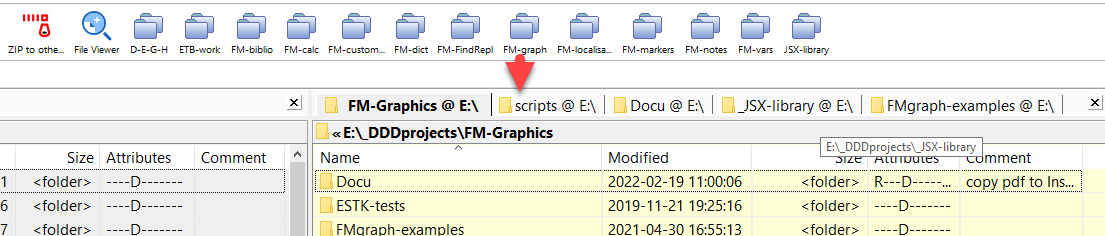
- Xplorer² is a great replacement for the Windows File Explorer and replaced on my desktop the long used PowerDesk from Avanquest. I learned about this tool from a user of my FrameMaker toolbarsduring a TeamViewer session to help her.One of the great features are folder groups:
Homegrown utilities
- Handle file attributes within a file structure
- Maintain a to-do-list.
- Rename files by means of a table
- TextHelper